Saturday, October 24, 2009

Web Craft Resources

So you want to be a web crafter? Here are some resources that will help you launch this power-packed career:

Design and Management Books [Some are online]
Software Tools
Note that most Linux distros have installers that will search and install these for you. The links are indicated for the sake of Windows users who must search, download and install manually ;(
  • GIMP - Graphics editor
  • wget - Download web sites
  • FileZilla FTP Client
  • Windows smart code editors: Scite , Notepad++
  • Tidy - checks your HTML code for errors
  • SWF Tools - Create Shockwave flash slideshows
  • OpenOffice - Free Office tools - wordprocessor, spreadsheet, presentation, one-button PDF creation, export presentation to flash SWF
Tutorials
  • W3schools - Good HTML, CSS, Javascript tutorials
  • HtmlDog - Good HTML and CSS tutorials

Thursday, June 25, 2009

E-Learning Design Principles with Web 2.0


Should e-learning be identical to traditional classroom learning? If so, in what way? Web 2.0 provides opportunity to re-engineer the design of instruction: new media, new methodology. Some very interesting discussions are presented in this article to help us reflect and re-orient ourself to the new media. I suggest you do not use Web 2.0 tools for delivery of new content until you read and reflect on the ideas below.

  1. Under-representation in design
  2. OTARA approach and Moore's presentation on OTARA
  3. Learner engagement and knowledge construction
  4. The Moodle book
The Bridge of Translation
Imagine you are on the near end of the bridge illustrated above. It is the bridge of transition from the traditional approach to instructional design and pedagogy to the Web 2.0 or "Education21" (21st Century education - my invention of terminology) approach.

You need to cross the bridge and get the treasure on the other side. The OTARA approach suggests you define your objectives first then the assessment method that will be used to measure the extent to which these objectives will have been met by the end of your course. Activities are the things the learner needs to do to achievethese objectives. Therefore, our job as Education21 teachers is principally to define the position of the far end of the bridge and provide a guide regarding how to get there. Finally, we need to provide the learner with the tools to enable them move to the destination and motivate them to get on with the job at hand.

Link

Wednesday, June 24, 2009

Imagery of the Web

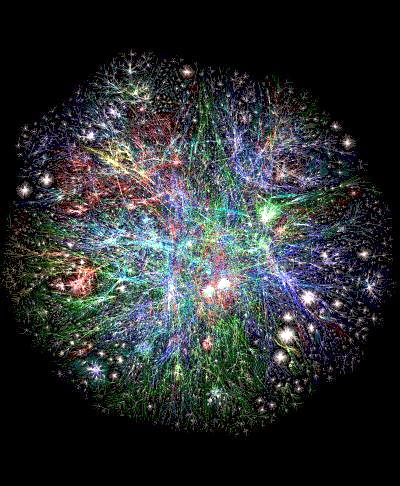
I have a friend who has problems reading books that have no pictures. And then there was this student in a certain university who never wrote any notes: he drew all his "notes". Therefore, for the sake of the pictorially inclined, here is a sample of the web in pictures.

Webearth


World Wide Web
The web is global. It covers the planet. It contains billions of documents. Yet only a minority of "earthlings" have contributed anything to it. What can you add to the web today?

The Information Superhighway
Some prefer to think of the Internet and the Web as a superhighway carries vast traffic consisting of "information." What is information anyway?

What is the Internet and the Web?

The Internet and the Web are closely related systems. They are like music and the sound of the music system. The music system plays music yet the two are not synonymous. The Internet (capitalised) is analogous to a music system while the web is synonymous with the music.

The Internet is made up of interconnected computers across the globe. They are connected with copper wires, microwave radios, satellite dishes and fibre optic cables. On these computers are mounted software called servers that hold and manage vast amounts of documents that make up the World Wide Web (WWW). These documents are created using a special technique that makes use of structuring elements called Hypertext Markup Language (HTML). These are used to mark the beginning and ends of such elements as headings, paragraphs, images, tables, lists and on-line forms.

Over the next five months, I shall provide detailed descriptions of how to create HTML-based documents.[Yes, this was done but the descriptions will be part of a small book on web design coming very soon]

Web Technologies
Over the last 15 years or so, several technologies have been created to improve various aspects of web content. These include:
  • Hypertext Markup Language (HTML) - used to structure web documents, now in version 5
  • Extensible Markup Language (XML) - - used to structure web documents, now in version??
  • Cascading Style Sheets (CSS) - used to add style information to web documents, now in version 3
  • Javascript - used to create dynamic effects on web documents and implement AJAX (Asynchronous Javascript and XML)
  • Scripting engines such as PHP, Java Server Pages and Ruby used to provide intelligence to web pages including publishing live data
  • Database Management Systems (DBMS) such as MySQL used to manage data.

Challenge of Developing E-Content


The effort required to develop a complete teaching module is considerable. It is similar to writing a book. Unlike a book which is considered in university promotions for academic staff, a blog or web-based module will not count. Therefore, my strategy to add value to the e-content module that I will develop and to self-motivate is to design the module in such a way that it can be released in book format also. That means I will work with two structures but one content-set.

The module, titled "Website Design, Construction and Management" will be divided into three sections:
  • Design
  • Construction and
  • Management of web sites
There will be five categories of topics including:
  1. HTML, XHTML and CSS
  2. Javascript and AJAX
  3. PHP, SQL, Apache and MySQL
  4. Design Principles and Processes
  5. Site Management

Monday, June 22, 2009


The main reason we go to school is top learn how to learn and to solve problems. The web allows you to do both very well. It is a storehouse of knowledge and solutions that other people have discovered or developed. It is also a place to learn for the sake of knowing.

Use the web to expand your horizons and find solutions to the many challenges you will encounter in life. But add something to the web too so that you can count yourself a contributor, not merely a consumer of knowledge.